
4.7/5 · 1,500+ ratings
Youth athletes, managed from their parents' accounts
With Epeak, several children sit under one parent account, switched in seconds. No phone or email asked of a minor, and every club message stays in a parent's view.
Create your club for free →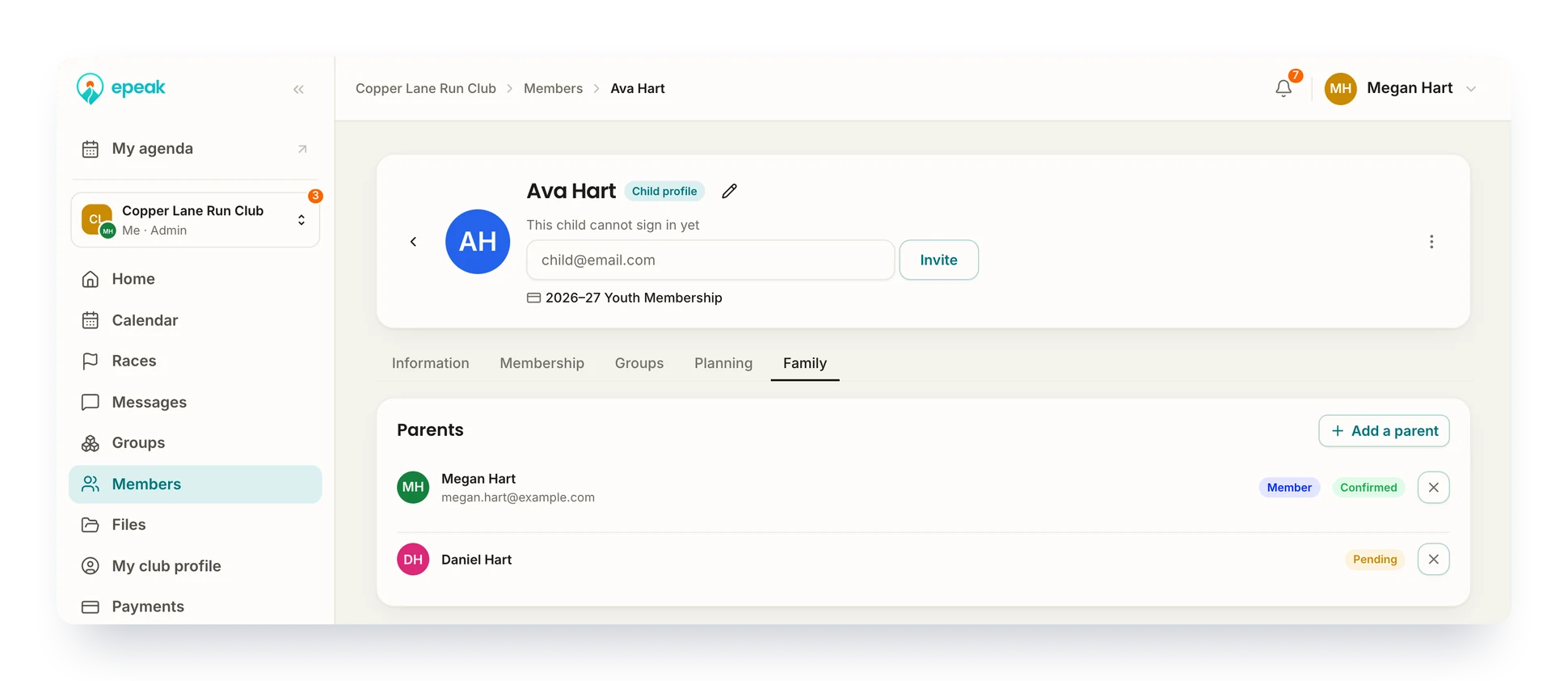
Used every day by 20,000+ endurance athletes to train with their club












A minor is not a member like any other
They may have no phone, no email, and two adults who both need to know what the club is planning. Epeak gives the child a profile and puts an adult behind it.
Linked
The club can see which adult answers for each child.
Shared
Two parents, two accounts, one child, and neither of them left out.
Lasting
When the child grows up, the profile becomes their own account.
From the club setting to the second parent
Club setting
Turn it on, and decide how far parents can go
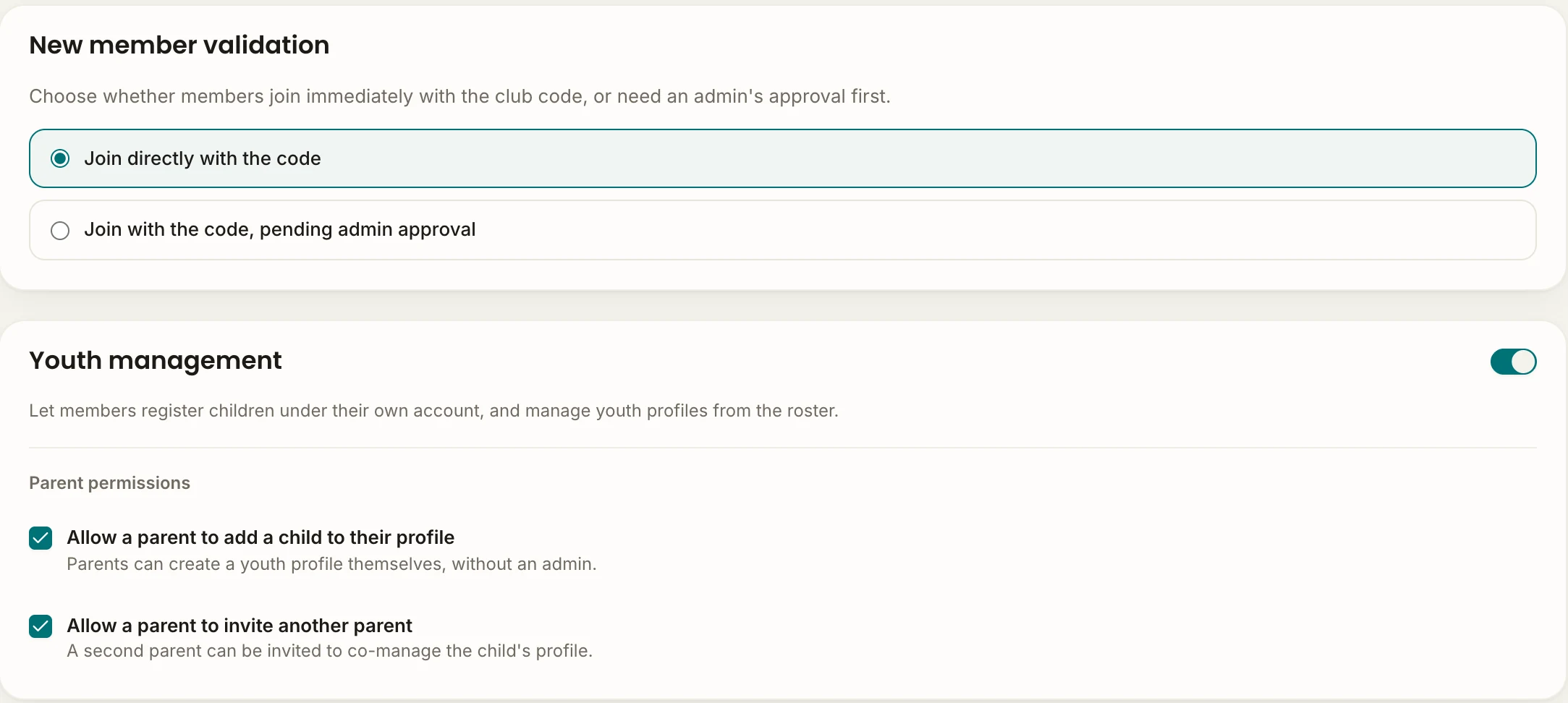
Kids sit on the list under a parent's email, and nobody can tell which adult is whose. Turn on youth management in the club settings. Two switches decide how much families handle alone.
- Both switches off, and no link is made without you
- Both on, and families set themselves up
- One setting for the whole club, not one per group
Enroll a child
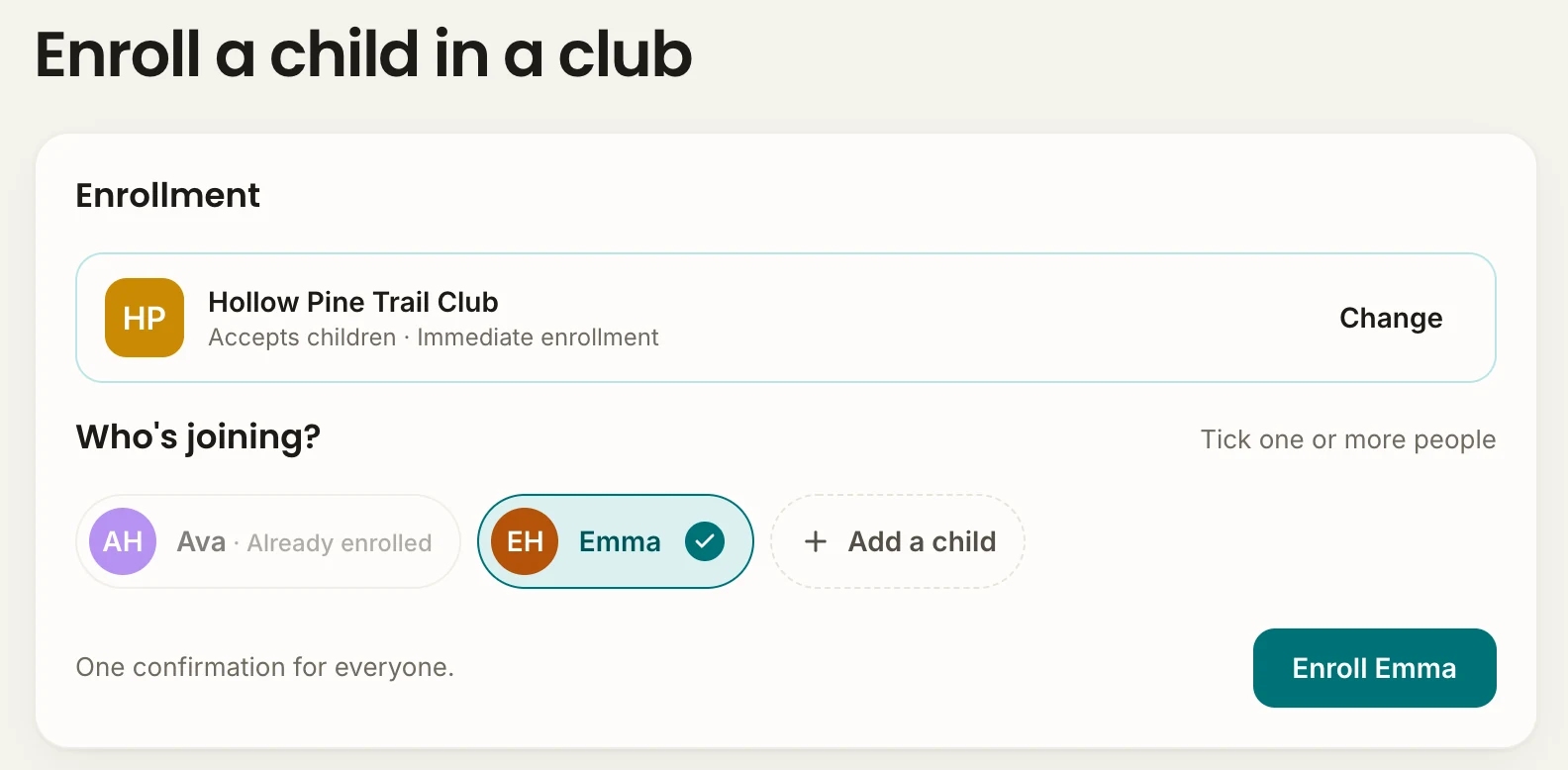
A parent enrolls the child, not themselves
A father joins the club to follow his daughter, and the club lists him as a member who never turns up. With Enroll a child, the parent brings the child into the club from their own account. The roster stays the people who train.
- A dedicated path, on the web or in the app
- A parent who trains too keeps a profile of their own
- The club rules are accepted before the first session
Child profiles
Add the child, pick who is joining
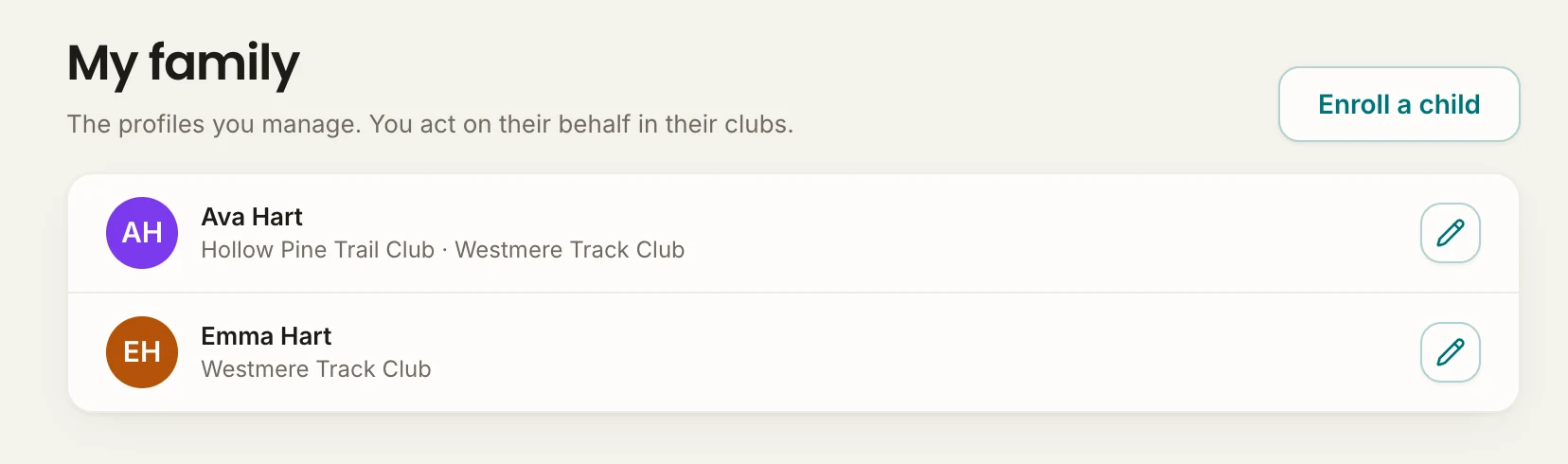
Three kids in the club, one family email address, and the youngest is nine. The parent adds each child once under My family, then acts as any of them in a few seconds. One adult account answers for all three.
- No phone and no email address needed for the child
- The child's notifications reach the parent
- My schedule shows the whole family's week, every club included
Two parents
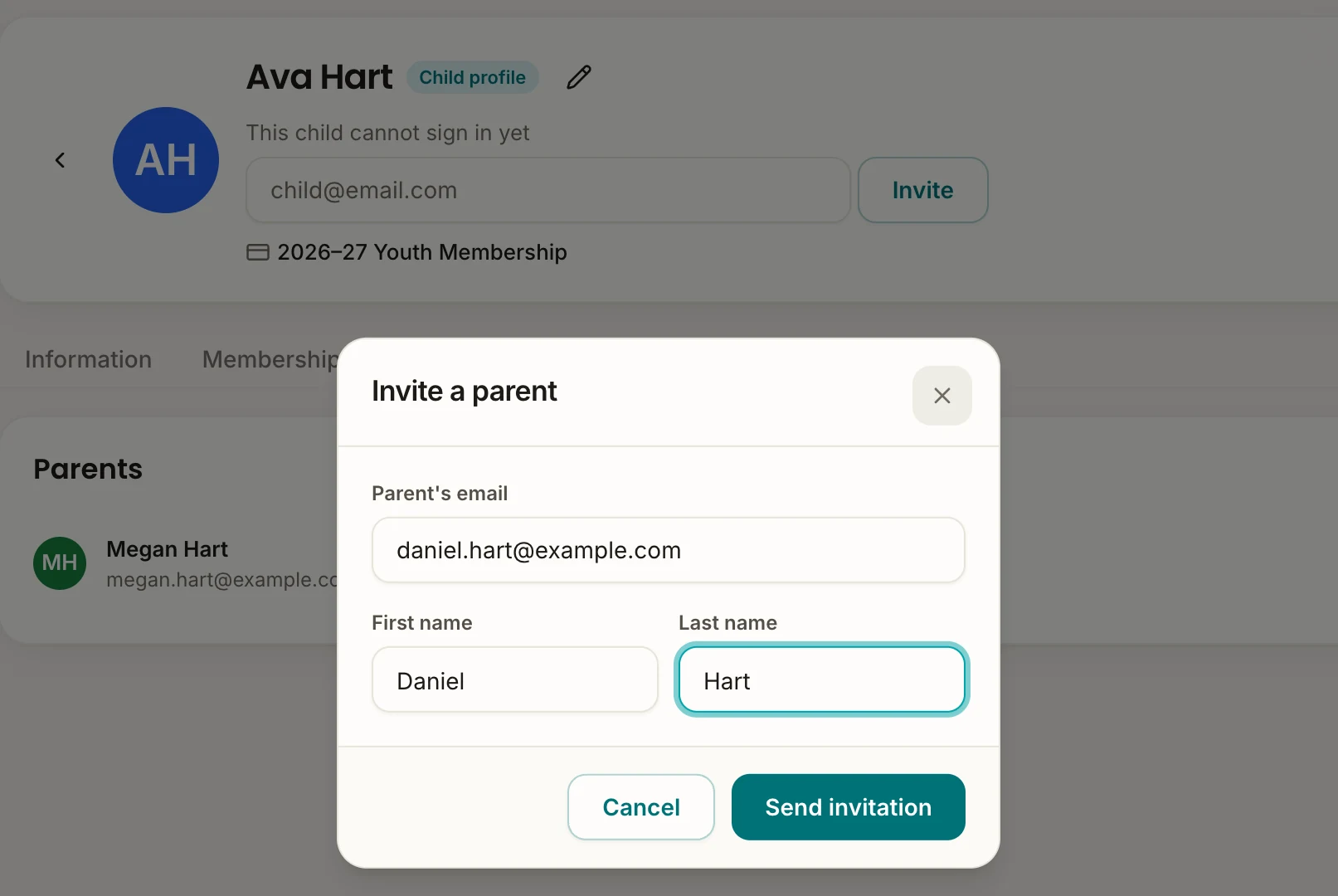
Invite the other parent to the same profile
The parents live apart, and only one of them ever hears about the club trip. Either can invite the other to the child's profile with a name and an email. Both follow the same calendar from then on.
- The second parent gets the same access as the first
- An admin can send the invitation from the admin space
- Nothing is linked until the invited parent accepts
Try it with your own club
Create your club for free →Building a new generation of clubs across the globe
Club leaders and coaches rely on Epeak to keep their members engaged.
We grew to several hundred members in a few months. Epeak is how we kept up: every meeting point and workout is set in the app, not lost in a giant group chat.

Adam
Founder and Run Club Leader at Harbat Running Lab
We wanted a community tool actually built for endurance sports. Epeak does that, and it runs our membership payments and our coached sessions too, single or unlimited, all in one place.

Chris
Founder and Head Coach at The Endurance Edge
Epeak has simplified our club management, making it easy to coordinate training sessions, plan off-trail trips, and organize races while keeping members engaged.

Florian
Trail Runner and Board Member at Marseille Trail Club
It can be extremely difficult to keep track of when everyone is racing. Epeak's race calendar solved that, and the event calendar keeps our group workouts and long runs in front of the whole team.

Seth
Team Director at Fitness Sports Distance Project
We have saved time in managing our athletes. Sharing training sessions is now simpler, reducing the need to answer repetitive questions.

Benjamin
Group Leader at EFS Reims Athlétisme Track Club
Epeak has transformed how we engage our triathlon community. Simple, effective, and built for endurance sports. Highly recommended!

Marcelo
Head Coach at Tri2One Miami
Frequently asked questions
Does a child need their own phone or email address?
No. A child profile lives inside a parent account. The parent switches to it from their own account, answers workouts and events on the child's behalf, reads the child's messages in the club and gets the child's notifications. A club can run a whole youth section without a single minor holding an account.
Can both parents follow the same child?
Yes. If the club allows it, a parent invites the other from the child's profile with a first name, last name and email. Otherwise an admin adds the second parent from the admin space. The invited parent accepts the link in Epeak and then has the same access as the first.
Can a parent add a child without asking us?
Only if you let them. Youth management carries two separate switches: one for parents adding a child themselves, one for parents inviting another parent. Leave them off and the links go through the club admin, which is the way Epeak recommends to avoid input errors. Each parent still confirms the link themselves.
Does a parent have to be a club member?
No. A parent who doesn't train with the club can still be linked to their child's profile and manage it, without becoming a member themselves.
Can the club see who is the parent of whom?
Yes. With youth management on, each member's file in the admin space has a tab for their family. From the admin space, an admin can also add a child and invite a parent.
What happens when the child is old enough for their own account?
An admin sets the email address the child will sign in with, and the child gets their own access to Epeak, on the same profile.